



Test HTML Script
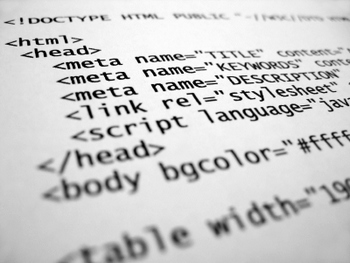
Page Ini Memberikan Kemudahan Bagi Para Wapper/Webber Menguji Script HTML Sebelum Di Upload. Masukkan Code Html Di Textarea Kemudian Tekan TEST. Hasilnya Akan Terlihat Di Kolom Bagian Bawah.
Script Memberikan Judul Artikel Ketika Di Copy Paste

Pada kesempatan kali ini saya sharing bagaimana menangkal TUKANG COPAS kenapa saya sharing karena sharing is SEXY .
Mungkin Cakra juga bisa melihat bahwa artikel nya banyak di COPAS oleh banyak orang yang tidak memberikan sumber / credit kepada penulis aslinya .
Jika banyak yang copy paste artikel kita rugi donk makanya saya sharing script ini untuk menghindari COPASSER yang main COPAS aja tanpa di baca dahulu .
Biasa kita memakai script dari tynt.com untuk menghindari COPASSER Tersebut tapi ini berbeda dan bukan dari tynt.com .
Langsung saja To teh ( kok teh puasa euy ) The Point
Langkah - langkah nya adalah :
- Login Blogger Dengan Google Akun Anda
- Jika sudah di dashboard Pergi Ke Rancangan » Edit HTML
- Masukkan script berikut di bawah kode <head> :
<script type='text/javascript'> function addLink() { var body_element = document.getElementsByTagName('body')[0]; var selection; selection = window.getSelection(); var pagelink = "<br/><br/> Read more at: <a href='"+document.location.href+"'>"+document.location.href+"</a><br/>Copyright Fachrulakberr.blogspot.com Under Common Share Alike Atribution"; // change this if you want var copytext = selection + pagelink; var newdiv = document.createElement('div'); newdiv.style.position='absolute'; newdiv.style.left='-99999px'; body_element.appendChild(newdiv); newdiv.innerHTML = copytext; selection.selectAllChildren(newdiv); window.setTimeout(function() { body_element.removeChild(newdiv); },0); }document.oncopy = addLink; </script> - Ganti url fachrulakberr.blogspot.com pada script dengan url blog Kamu .
- Setelah itu simpan template .
- Selesai .
Jika anda melakukan langkah-langkah di atas dengan benar maka coba tes di blog anda copy artikel anda sendiri terus taruh di notepad apa yang terjadi ada url blog kamu di artikel tersebut pada bagian Bawahnya .
Sekian tutorial saya .
Wassalamu’alaikum Wr. Wb
Pointstone System Cleaner 5.9.4.359

DOWNLOAD Pointstone System Cleaner 5.9.4.359
System Cleaner™ is a tool for restoring hard-drive space, cleaning up the history of your activities on your computer and keeping your system running like new. The program allows you to clean your drives from unnecessary and temporary files, including your browser cache, cookies, history, recent document list, temporary files, errant uninstall entries and more. It targets more than 100 file extensions, which enable it to scan and recognize most of the unnecessary files on your computer.
You can choose to delete the files to the recycle bin or to a specified backup folder. In addition, System Cleaner includes a Windows Startup manager and also allows you to remove invalid uninstaller information from the registry as well as a restore wizard to undo the changes if needed.
Key Features:
• Restores your hard drive's performance, hard-drive space and protect your privacy by cleaning Internet history, cache, temporary files, Windows temp files, recent document list, find history, run history, *.CHK files, the recycle bin, additional garbage and much, much more.
• Scans dead shortcuts from your Start menu and Desktop. If it finds any shortcuts that point to files that do not exist, it will list them for you.
• Lets you delete or disable entries that automatically start on Windows startup. This pulls all entries from your Start Menu-Programs-Startup folder as well as from the registry.
• Define your own user defined items to remove (specified files or folders).
• Backup files to a ZIP file or proprietary file format. You can later restore individual files using the "Restore Wizard".
• Clean Directories and Internet Cache Files. Allows you to clean directories that usually have Temporary Files or cache files (Windows Temp Directory, Documents Folder, MS Internet Explorer Cache Directory and Netscape Cache Directory).
• Powerful file search. You can select to scan for files between a certain date, with some or all file attributes, with a certain size or with the contents of a file matching a user-defined text string.
• Remove files to Recycle Bin, zip them, move them to a folder or completely delete them!
• Scans multiple hard drives.
• Fixes system errors that slow your PC down and cause it to crash
• Speeds up your PC's execution of software programs
• Removes space-wasting temporary files and other unnecessary disk clutter
• Tunes up and optimizes the Windows Registry
• Erases all evidence of your computer and internet activity
• Makes your PC boot faster
• Makes your PC shutdown faster
• Fine-tunes all important Windows settings
Key Features:
• Restores your hard drive's performance, hard-drive space and protect your privacy by cleaning Internet history, cache, temporary files, Windows temp files, recent document list, find history, run history, *.CHK files, the recycle bin, additional garbage and much, much more.
• Scans dead shortcuts from your Start menu and Desktop. If it finds any shortcuts that point to files that do not exist, it will list them for you.
• Lets you delete or disable entries that automatically start on Windows startup. This pulls all entries from your Start Menu-Programs-Startup folder as well as from the registry.
• Define your own user defined items to remove (specified files or folders).
• Backup files to a ZIP file or proprietary file format. You can later restore individual files using the "Restore Wizard".
• Clean Directories and Internet Cache Files. Allows you to clean directories that usually have Temporary Files or cache files (Windows Temp Directory, Documents Folder, MS Internet Explorer Cache Directory and Netscape Cache Directory).
• Powerful file search. You can select to scan for files between a certain date, with some or all file attributes, with a certain size or with the contents of a file matching a user-defined text string.
• Remove files to Recycle Bin, zip them, move them to a folder or completely delete them!
• Scans multiple hard drives.
• Fixes system errors that slow your PC down and cause it to crash
• Speeds up your PC's execution of software programs
• Removes space-wasting temporary files and other unnecessary disk clutter
• Tunes up and optimizes the Windows Registry
• Erases all evidence of your computer and internet activity
• Makes your PC boot faster
• Makes your PC shutdown faster
• Fine-tunes all important Windows settings

Oloneo PhotoEngine v1.0.400.306
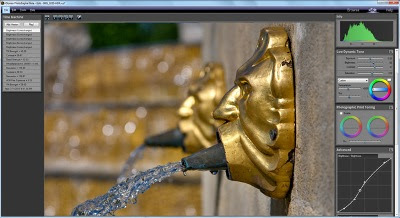
DOWNLOAD Oloneo PhotoEngine v1.0.400.306
It is now a fast and easy process to modify lighting or to recover details in a deeply under- or overexposed picture. By merging multiple photos of the same scene, Oloneo PhotoEngine not only offers an almost unlimited control over exposure and lighting but also provides a new level of creativity in digital photography.
Color Engine General
Full real time environment
96-bit per pixel
32-bit floating point color channels
High Dynamic Range
Ultra wide gamut
Fully real-time
Non-destructive image editing
Highly optimized multi-thread, multi-processor, multi-core engine
Highly optimized vectorized code
Unlimited undo/redo
Modification history
User Interface General
Task-oriented, Workspaces -based user interface
Uncluttered user interface
Workspaces:
Browse Workspace
Edit Workspace
Help Workspace
Collapsible tool panels
Integrated video help:
Quick Tour Video
Creating an HDR ToneMap Project Video
Creating an HDR ReLight Project Video
Creating an HDR DeNoise Project Video
HDR ToneMap Tutorial Video
HDR ReLigth Tutorial Video
Image Editing Tutorial Video
Advanced Curve Tutorial Video
Brightness Curve Tutorial Video
Photographic Print Toning Tutorial Video
Browse Workspace
Multithreaded thumbnail reading
Image folder browsing
Image list with thumbnails for:
Raw photo files
Jpeg files
Tiff files
Metadata display for:
Raw photo files
Jpeg files
Tiff file
Image Info Panel with:
Speed
Aperture
Iso
Exposure
Date
File type
Camera name
Beta Version Panel
Image folder selection menu:
Select with File Dialog
Select with Folder Dialog
Recent folders
Direct path
Select with file dialog button
Thumbnail size slider
Recent Project Panel with thumbnail
Project Image Selection Panel with:
Image thumbnail
Editable shutter speed
Editable F-Number
Editable ISO
Editable EV
Relative Stop mode
Add selection button
Delete selection button
Clear selection button
HDR ToneMap Panel with:
Contextual help
Video Help button
Auto-Align Mode
Project creation button
HDR ReLight Panel with:
Contextual help
Video Help button
Project creation button
HDR DeNoise Panel with:
Contextual help
Video Help button
Auto-Align Mode
Workspace switch buttons
Workspace switch menu
Direct Open file menu
Full real time environment
96-bit per pixel
32-bit floating point color channels
High Dynamic Range
Ultra wide gamut
Fully real-time
Non-destructive image editing
Highly optimized multi-thread, multi-processor, multi-core engine
Highly optimized vectorized code
Unlimited undo/redo
Modification history
User Interface General
Task-oriented, Workspaces -based user interface
Uncluttered user interface
Workspaces:
Browse Workspace
Edit Workspace
Help Workspace
Collapsible tool panels
Integrated video help:
Quick Tour Video
Creating an HDR ToneMap Project Video
Creating an HDR ReLight Project Video
Creating an HDR DeNoise Project Video
HDR ToneMap Tutorial Video
HDR ReLigth Tutorial Video
Image Editing Tutorial Video
Advanced Curve Tutorial Video
Brightness Curve Tutorial Video
Photographic Print Toning Tutorial Video
Browse Workspace
Multithreaded thumbnail reading
Image folder browsing
Image list with thumbnails for:
Raw photo files
Jpeg files
Tiff files
Metadata display for:
Raw photo files
Jpeg files
Tiff file
Image Info Panel with:
Speed
Aperture
Iso
Exposure
Date
File type
Camera name
Beta Version Panel
Image folder selection menu:
Select with File Dialog
Select with Folder Dialog
Recent folders
Direct path
Select with file dialog button
Thumbnail size slider
Recent Project Panel with thumbnail
Project Image Selection Panel with:
Image thumbnail
Editable shutter speed
Editable F-Number
Editable ISO
Editable EV
Relative Stop mode
Add selection button
Delete selection button
Clear selection button
HDR ToneMap Panel with:
Contextual help
Video Help button
Auto-Align Mode
Project creation button
HDR ReLight Panel with:
Contextual help
Video Help button
Project creation button
HDR DeNoise Panel with:
Contextual help
Video Help button
Auto-Align Mode
Workspace switch buttons
Workspace switch menu
Direct Open file menu
Moo0 ImageViewer SP 1.72
DOWNLOAD Moo0 ImageViewer SP 1.72
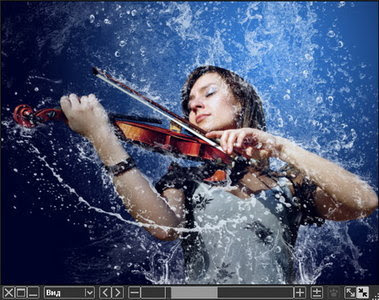
Moo0 ImageViewer SP is a new breed of image viewer which we Moo0 developers present with passion. Its window occupies minimum space on desktop and also resizes very flexibly. Also, it now has many useful filters in its compact body. For example, "Cartoon Reader" filter can make image texts far more readable, and "Clear Photo" filter can make some pictures look far more dynamic.
Do you sometimes want to see pictures in your own taste? or want to keep multiple pictures open on desktop? Then, this software may be the one you've been looking for. Further more, this SP version is equipped with easy-to-use edit / save functionalities, including the ones which enable you to easily save images in the sizes / colors / shapes of your needs, easily take the screenshots of specific windows, convert multiple images into the required styles at once, and so forth.
Tips:
[Double-Click] - Maximize / Restore Window
[Middle-Button Click] - Close Window
[L/R Arrow Key] - Go Previous / Next Image
[Del Key] - Delete the current image file
Please try [Middle-Button Scroll], [U/D Arrow Key] when it's on fit mode. The window will resize very flexibly together with the image.
Also, when you view cartoon / text images, please load "Cartoon Reader" filter and lock it over those images. It will adjust their sizes, sharpness and contrast for more comfortable reading. Also, using "Clear Photo" filter in the same manner, some photos can look far more dynamic.
Support Language: Belarusian, Dutch, English, French, German, Italian, Japanese, Korean, Russian, Spanish, Turkish, Ukrainian
OS : Win XP/2000/Vista/Win 7
Language : Multilingual
Tips:
[Double-Click] - Maximize / Restore Window
[Middle-Button Click] - Close Window
[L/R Arrow Key] - Go Previous / Next Image
[Del Key] - Delete the current image file
Please try [Middle-Button Scroll], [U/D Arrow Key] when it's on fit mode. The window will resize very flexibly together with the image.
Also, when you view cartoon / text images, please load "Cartoon Reader" filter and lock it over those images. It will adjust their sizes, sharpness and contrast for more comfortable reading. Also, using "Clear Photo" filter in the same manner, some photos can look far more dynamic.
Support Language: Belarusian, Dutch, English, French, German, Italian, Japanese, Korean, Russian, Spanish, Turkish, Ukrainian
OS : Win XP/2000/Vista/Win 7
Language : Multilingual
PVII Horizontal Accordion Panel Magic 1.16 For Dreamweaver

DOWNLOAD PVII Horizontal Accordion Panel Magic 1.16 For Dreamweaver
We looked at the most popular horizontal accordion widgets on the market and were appalled. Simply stated, they fall short of meeting our baseline standards for quality, usability, and accessibility. And judging by the number of requests we've had for a PVII horizontal accordion, they fall short of your standards, as well. What you see here is the most powerful, feature-rich, and refined widget of its kind... anywhere. If quality is as important to you as it is to us, then say hello to the horizontal accordion you've been waiting for.
Like all PVII widgets, each line of code that powers Horizontal Accordion Panel Magic is written by us. To achieve the level of refinement and features that are the hallmarks of a PVII widget, open source libraries are simply out of the question. To make sure that this widget can stand up to proportional widths, fixed widths, text resizing, mobile browsers, and older browsers, it had to be designed and programmed the PVII way.
Features and Options
• An automated interface in which to create, configure, and manage your widgets
• 12 fully customizable CSS style themes are included
• Fully accessible to assistive readers and for keyboard browsing
• Fully accessible to all search-engines and when javascript is disabled
• Fast Loading—programmed to be ready for use as soon as the markup loads even if other page assets are still loading
• Use Click or MouseOver/MouseOut events to operate panels
• Use text or images for panel headings
• When using images, the system can fully automate image swapping for up to 4 states
• Works in Dreamweaver Templates and Template child pages
• Auto link highlighting and panel opening for "you are here" when page address matches a link inside one of the panels—a cool feature when using an accordion as a menu
• Panel headings can be set as stand-alone links to external pages instead of opening a hidden content panel making it a snap to use APM2 as a navigation menu
• Choose from 2 animation styles or use no animation
• Option to show only one panel at a time
• Option to always keep one panel open
• Options to hide all panels, show all panels, or show a specific panel on page load
• Set a random panel to show on page load
• Set all panels to show and then glide to a hidden state
• Auto-rotate panels on load—setting the number of cycles and the duration between panels
• Suite of Control Behaviors to map Accordion actions to links anywhere on your page
• External linking and bookmarking support
• Integrated Help Files
• Online PDF User Guide
• Free Unlimited Support
Main Features...
Your PVII horizontal accordion is created and managed from the comfort of an automated interface inside Dreamweaver. Code is clean and content is always accessible, even when javascript is disabled. Mobile devices (like iPhones and iPads) are automatically detected and coddled with special code to make them behave nicely. Text in triggers is stacked, not rotated, so you never need to turn your head sideways to read it. Animation options include linear slide, easing slide, easing bounce, or none. Set a specific panel or a random panel to open on page load. Your widget can be set to autoplay for a set number of cycles or continuously. Triggers (panel headings) can be text, images, or a combination. Image swapping is fully supported and completely automatic. Choose from an assortment of CSS-based style themes (skins) that can be deployed out of the box or customized to your needs.
Features and Options
• An automated interface in which to create, configure, and manage your widgets
• 12 fully customizable CSS style themes are included
• Fully accessible to assistive readers and for keyboard browsing
• Fully accessible to all search-engines and when javascript is disabled
• Fast Loading—programmed to be ready for use as soon as the markup loads even if other page assets are still loading
• Use Click or MouseOver/MouseOut events to operate panels
• Use text or images for panel headings
• When using images, the system can fully automate image swapping for up to 4 states
• Works in Dreamweaver Templates and Template child pages
• Auto link highlighting and panel opening for "you are here" when page address matches a link inside one of the panels—a cool feature when using an accordion as a menu
• Panel headings can be set as stand-alone links to external pages instead of opening a hidden content panel making it a snap to use APM2 as a navigation menu
• Choose from 2 animation styles or use no animation
• Option to show only one panel at a time
• Option to always keep one panel open
• Options to hide all panels, show all panels, or show a specific panel on page load
• Set a random panel to show on page load
• Set all panels to show and then glide to a hidden state
• Auto-rotate panels on load—setting the number of cycles and the duration between panels
• Suite of Control Behaviors to map Accordion actions to links anywhere on your page
• External linking and bookmarking support
• Integrated Help Files
• Online PDF User Guide
• Free Unlimited Support
Main Features...
Your PVII horizontal accordion is created and managed from the comfort of an automated interface inside Dreamweaver. Code is clean and content is always accessible, even when javascript is disabled. Mobile devices (like iPhones and iPads) are automatically detected and coddled with special code to make them behave nicely. Text in triggers is stacked, not rotated, so you never need to turn your head sideways to read it. Animation options include linear slide, easing slide, easing bounce, or none. Set a specific panel or a random panel to open on page load. Your widget can be set to autoplay for a set number of cycles or continuously. Triggers (panel headings) can be text, images, or a combination. Image swapping is fully supported and completely automatic. Choose from an assortment of CSS-based style themes (skins) that can be deployed out of the box or customized to your needs.
NeoDownloader 2.7.0.148 Portable

DOWNLOAD NeoDownloader 2.7.0.148 Portable
NeoDownloader allows you to download and view any picture from the Web easily and automatically.
It has a user-friendly interface and is very easy to use. Just type the Web site address and Express WebPictures will download every found picture for you thus saving your time and money.
Flexible options and filters will allow you to download only high quality pictures.
Here are some key features of "NeoDownloader":
· Downloads your choice of pictures, audio, video and any other files.
· Easy to use even for beginners.
· No pop-ups and banners.
· Powerful intelligent web spider engine.
· Up to 10 simultaneous connections.
· Downloads from TGP sites, password protected sites.
· Supports downloading URL ranges.
· Advanced filtering - allows to download only those what you want.
· Built-in image viewer with slideshow capabilities.
· Built-in audio/video player.
· Ability to set any downloaded picture as a Windows wallpaper.
Flexible options and filters will allow you to download only high quality pictures.
Here are some key features of "NeoDownloader":
· Downloads your choice of pictures, audio, video and any other files.
· Easy to use even for beginners.
· No pop-ups and banners.
· Powerful intelligent web spider engine.
· Up to 10 simultaneous connections.
· Downloads from TGP sites, password protected sites.
· Supports downloading URL ranges.
· Advanced filtering - allows to download only those what you want.
· Built-in image viewer with slideshow capabilities.
· Built-in audio/video player.
· Ability to set any downloaded picture as a Windows wallpaper.
Raiden RaidenMAILD 1.9.17.13

DOWNLOAD Raiden RaidenMAILD 1.9.17.13
Mail Server is a necessary tool for the world wide communication and RaidenMAILD is designed to help with. RaidenMAILD is a easy-to-use SMTP / POP3 / WebMail Mail Server designed for home and enterprise users, it is so easy to setup that everyone can possibly do it by yourself even if you never setup mail server. It is not only easy to use but also features various professional mechanisms such as anti-spam mechanisms, filtering, SSL security, 2SMTP infrastructure, health monitoring, firewall and Active Directory / Database integration.
- Easy to use SMTP/POP3/Webmail Mail Server
- Rich in features : All in one Mail Server
- Low prime price & lifetime update for free
- High performance & stability
Features of RaidenMAILD:
- EASY for everyone
- Smart SMTP Relay
- Server Relay (for incoming mails) / SMTP routing table (for outgoing mails)
- IP Address restriction
- Subject title/ Conent/ Attachment filtering with normal comparison/ Advanced PCRE comparison
- Disk Quota Restriction
- Unlimited domains to single IP
- Starts with NT Service via ServiceAgent - Service Installer / Health monitor
- Automatic email re-sending mechanism
- SMTP /POP3 restriction options
- Event Logging to screen, disk file, and analyser are available!
- Web-based Remote Control System
- Multilingual Web Mail System
- Web Mail customization
- Dynamic IP re-assignment
- Automatic mail footer for mail messages
- Mailing list
- E-mail forwarding
- Automatic mail replying
- Backup all incoming/outgoing mails for monitoring purpose in corporations
- Event Processor
- Memory optimization
- Mass mail sending
- SMTP Auth
- Online registration
- DBMS support
- Password reset mail mechanism
- SSL transmission
- Multi-POP for external mailboxes
- ICQ / MSN Center provides real-time contact service
- Integration with Active Directory
- Anti-spam mechanisms
- RaidenMaild Http Interface (RMHI)
- Dual SMTP services
- Alias mail mapping
- Spam Mail Report
- Firewall
OS : Win XP/2000/Vista/Win 7
Language : English
- Rich in features : All in one Mail Server
- Low prime price & lifetime update for free
- High performance & stability
Features of RaidenMAILD:
- EASY for everyone
- Smart SMTP Relay
- Server Relay (for incoming mails) / SMTP routing table (for outgoing mails)
- IP Address restriction
- Subject title/ Conent/ Attachment filtering with normal comparison/ Advanced PCRE comparison
- Disk Quota Restriction
- Unlimited domains to single IP
- Starts with NT Service via ServiceAgent - Service Installer / Health monitor
- Automatic email re-sending mechanism
- SMTP /POP3 restriction options
- Event Logging to screen, disk file, and analyser are available!
- Web-based Remote Control System
- Multilingual Web Mail System
- Web Mail customization
- Dynamic IP re-assignment
- Automatic mail footer for mail messages
- Mailing list
- E-mail forwarding
- Automatic mail replying
- Backup all incoming/outgoing mails for monitoring purpose in corporations
- Event Processor
- Memory optimization
- Mass mail sending
- SMTP Auth
- Online registration
- DBMS support
- Password reset mail mechanism
- SSL transmission
- Multi-POP for external mailboxes
- ICQ / MSN Center provides real-time contact service
- Integration with Active Directory
- Anti-spam mechanisms
- RaidenMaild Http Interface (RMHI)
- Dual SMTP services
- Alias mail mapping
- Spam Mail Report
- Firewall
OS : Win XP/2000/Vista/Win 7
Language : English
R-Drive Image 4.7 Build 4730

DOWNLOAD R-Drive Image 4.7 Build 4730
R-Drive Image is a potent utility providing disk image files creation for backup or duplication purposes. A disk image file contains the exact, byte-by-byte copy of a hard drive, partition or logical disk and can be created with various compression levels on the fly without stopping Windows OS and therefore without interrupting your business.
These drive image files can then be stored in a variety of places, including various removable media such as CD-R(W)/DVD, Iomega Zip or Jazz disks, etc. R-Drive Image restores the images on the original disks, on any other partitions or even on a hard drive's free space on the fly. To restore system and other locked partitions R-Drive Image is switched to the pseudo-graphic mode directly from Windows or bootable version created by the utility is launched from CD disc or diskettes. R-Drive Image is one of the best backup and disaster recovery solutions to prevent losing your data after a fatal system failure.
Using R-Drive Image, you can completely and rapidly restore your system after heavy data loss caused by an operating system crash, virus attack or hardware failure. You can also use R-Drive Image for mass system deployment when you need to setup many identical computers. In other words, you can manually setup one system only, create an image of the system, and then deploy it on all other computers, saving your time and costs. If you need to restore only certain files from a disk image, you can connect that image as a virtual disk and copy those files directly from the disk image using Windows Explorer or any other file utility.
R-Drive Image features:
* A simple wizard interface - no in-depth computer management skills are required.
* On-the-fly actions: Image files are created on-the-fly, no need to stop and restart Windows. All other disk writes are stored in a cache until the image is created. Data from image files are restored on-the-fly as well, except on a system partition. Data to the system partition can be restored either by restarting R-Drive Image in its pseudo-graphic mode directly from Windows, or by using specially created startup disks.
* Image files compression. Image files can be compressed to save free storage space.
* Removable media support. Image files can be stored on removable media.
* Network support. R-Drive Image bootable CD version supports disk image file creation and restoration over Microsoft network (CIFS protocol).
* Pseudo-graphic mode. Restart to the pseudo-graphic mode directly from Windows to restore data to the system and other locked partitions. No need to use startup disks any more.
* Extended List of the supported devices. The list of hardware supported by R-Drive Image bootable versions has been extended. VIEW THE LIST
* USB 2.0 devices support in the pseudo-graphic mode. With hard drives prices constantly going down, an external IDE-USB 2.0 HDD case with an appropriate hard drive is an ideal (fast and reliable) solution for notebooks and sealed PCs to backup system and other partitions that can be restored only in the pseudo-graphic mode. Do not use numerous unreliable CD discs and slow CD/DVD recorders any more. Remember: with the incremental backup, this hard drive is not to be too large.
* Bootable version. Special bootable disks (either 2 floppy disks or one CD) can be created to restore data to the system partition.
* Individual files and folders restoration. A disk image can be connected as a read-only virtual drive and its content can be viewed and copied.
* Image files splitting. Drive images can be split into several files to fit a storage medium.
* Image Protection. Disk image files can be password-protected and contain comments.
* File system conversion. The file system of the restored disk can be converted to another one (FAT16 to FAT32 and vise versa.).
* New partition creation. Data from a disk image can be restored on a free (unpartitioned) space on any place on a hard drive. The size of the restored partition can be changed.
* Partition replacement. Data from a disk image can be restored on other existing partitions. R-Drive Image deletes such partitions and restores data on that free space.
* Disk to Disk copy. An entire disk can be directly copied on another one.
* Image files verification. You may check if your image files are good before you store them or restore data from them.
* Scheduler. A time for disk image creation may be scheduled and the process can be run in unattended mode.
* Script creation for frequent or unattended actions. Such scripts for creating an image file and appending data to an existing image file are created from the R-Drive Image interface the same way the actual action is performed. Scripts are executed from a command line and such command can be included to any command file.
* Action Report. When disk image is successfully created or the action fails the report can be automatically sent over e-mail or an external application can be launched.
New R-Drive Image features in version 4.x :
* Windows Vista and 64 bit processors support. New R-Drive Image version supports all Windows Vista operating systems and 64 bit processors.
* Acceleration of image creation and disc copy operations. Asynchronous I/O and distributed the zlib compression library were added among different processors. As a result, users can see up to 200% speed gains in image creation and disc copy operations.
* Differential image creation. When the incremental/differential backup is being created, the differential image can be created by comparing the current data with the 128-bit hash of the original data without reading the main image. That speeds up the process of creating the incremental/differential image in any case, but also no need to change the original discs when writing the image to CD/DVD discs.
* Incremental image creation mode. In the previous versions the differential mode was available only.
* A bootable module can be written to a CD/DVD disc together with the image data. Thus it is possible to create one CD/DVD disc to boot and to restore the system.
* Microsoft Volume Shadow Copy Service (VSS) support. In order to create a point-in-time snapshot of a database, the servers like Microsoft Exchange, Microsoft SQL and Oracle are notified before backup process begins. The technology allows synchronizing the servers' database and creating the correct copies of quick-changeable data.
* Dynamic Disks and BSD slices support. Dynamic disks and BSD slices can be backup, restored and copied. The feature is supported in both Windows and bootable versions of R-Drive image. You may create an image of one disk or a volume of any type and then restore the image back to a dynamic or basic disk. However when such image is restored you may not change a size or other characteristics of the target disk. When you restore a dynamic disk image to a basic disk, the basic disk remains basic and is not converted to the dynamic disk.
* A flexible control over CD/DVD writing. That allows limiting the writing speed and cashing in the ISO file.
* Improved file format of the image created by the application.
* Writing to NTFS partitions. Now the R-Drive Image bootable version (based on the Linux kernel) supports writing to NTFS partitions as well as R-Drive Image Windows version.
Using R-Drive Image, you can completely and rapidly restore your system after heavy data loss caused by an operating system crash, virus attack or hardware failure. You can also use R-Drive Image for mass system deployment when you need to setup many identical computers. In other words, you can manually setup one system only, create an image of the system, and then deploy it on all other computers, saving your time and costs. If you need to restore only certain files from a disk image, you can connect that image as a virtual disk and copy those files directly from the disk image using Windows Explorer or any other file utility.
R-Drive Image features:
* A simple wizard interface - no in-depth computer management skills are required.
* On-the-fly actions: Image files are created on-the-fly, no need to stop and restart Windows. All other disk writes are stored in a cache until the image is created. Data from image files are restored on-the-fly as well, except on a system partition. Data to the system partition can be restored either by restarting R-Drive Image in its pseudo-graphic mode directly from Windows, or by using specially created startup disks.
* Image files compression. Image files can be compressed to save free storage space.
* Removable media support. Image files can be stored on removable media.
* Network support. R-Drive Image bootable CD version supports disk image file creation and restoration over Microsoft network (CIFS protocol).
* Pseudo-graphic mode. Restart to the pseudo-graphic mode directly from Windows to restore data to the system and other locked partitions. No need to use startup disks any more.
* Extended List of the supported devices. The list of hardware supported by R-Drive Image bootable versions has been extended. VIEW THE LIST
* USB 2.0 devices support in the pseudo-graphic mode. With hard drives prices constantly going down, an external IDE-USB 2.0 HDD case with an appropriate hard drive is an ideal (fast and reliable) solution for notebooks and sealed PCs to backup system and other partitions that can be restored only in the pseudo-graphic mode. Do not use numerous unreliable CD discs and slow CD/DVD recorders any more. Remember: with the incremental backup, this hard drive is not to be too large.
* Bootable version. Special bootable disks (either 2 floppy disks or one CD) can be created to restore data to the system partition.
* Individual files and folders restoration. A disk image can be connected as a read-only virtual drive and its content can be viewed and copied.
* Image files splitting. Drive images can be split into several files to fit a storage medium.
* Image Protection. Disk image files can be password-protected and contain comments.
* File system conversion. The file system of the restored disk can be converted to another one (FAT16 to FAT32 and vise versa.).
* New partition creation. Data from a disk image can be restored on a free (unpartitioned) space on any place on a hard drive. The size of the restored partition can be changed.
* Partition replacement. Data from a disk image can be restored on other existing partitions. R-Drive Image deletes such partitions and restores data on that free space.
* Disk to Disk copy. An entire disk can be directly copied on another one.
* Image files verification. You may check if your image files are good before you store them or restore data from them.
* Scheduler. A time for disk image creation may be scheduled and the process can be run in unattended mode.
* Script creation for frequent or unattended actions. Such scripts for creating an image file and appending data to an existing image file are created from the R-Drive Image interface the same way the actual action is performed. Scripts are executed from a command line and such command can be included to any command file.
* Action Report. When disk image is successfully created or the action fails the report can be automatically sent over e-mail or an external application can be launched.
New R-Drive Image features in version 4.x :
* Windows Vista and 64 bit processors support. New R-Drive Image version supports all Windows Vista operating systems and 64 bit processors.
* Acceleration of image creation and disc copy operations. Asynchronous I/O and distributed the zlib compression library were added among different processors. As a result, users can see up to 200% speed gains in image creation and disc copy operations.
* Differential image creation. When the incremental/differential backup is being created, the differential image can be created by comparing the current data with the 128-bit hash of the original data without reading the main image. That speeds up the process of creating the incremental/differential image in any case, but also no need to change the original discs when writing the image to CD/DVD discs.
* Incremental image creation mode. In the previous versions the differential mode was available only.
* A bootable module can be written to a CD/DVD disc together with the image data. Thus it is possible to create one CD/DVD disc to boot and to restore the system.
* Microsoft Volume Shadow Copy Service (VSS) support. In order to create a point-in-time snapshot of a database, the servers like Microsoft Exchange, Microsoft SQL and Oracle are notified before backup process begins. The technology allows synchronizing the servers' database and creating the correct copies of quick-changeable data.
* Dynamic Disks and BSD slices support. Dynamic disks and BSD slices can be backup, restored and copied. The feature is supported in both Windows and bootable versions of R-Drive image. You may create an image of one disk or a volume of any type and then restore the image back to a dynamic or basic disk. However when such image is restored you may not change a size or other characteristics of the target disk. When you restore a dynamic disk image to a basic disk, the basic disk remains basic and is not converted to the dynamic disk.
* A flexible control over CD/DVD writing. That allows limiting the writing speed and cashing in the ISO file.
* Improved file format of the image created by the application.
* Writing to NTFS partitions. Now the R-Drive Image bootable version (based on the Linux kernel) supports writing to NTFS partitions as well as R-Drive Image Windows version.
 Previous Article
Langganan:
Postingan (Atom)


