-->

Perhatian

Welcome

Untuk kebaikan bersama, sahabat yang berminat tukeran link atau banner diharapkan bisa meninggalkan pesan di buku tamu atau tulis komentar di salah satu posting tapi saya anjurkan untuk wajib mengisi buku tamu untuk memberi tahu saya :) , selanjutnya saya akan memasang link atau banner sahabat yang sudah memasang link atau banner blog saya di blog sahabat..

Loading

solusi trouble link Mediafire

ATTENTION PLEASE....!!!! Untuk semua link Mediafire,setelah 5 detik akan muncul tulisan "SKIP AD" di pojok kanan atas. klik tombol skip ad-nya cukup didrag (tekan dan geser) dan arahkan ke address bar seperti gambar di bawah ini lalu ENTER.

Mengembalikan Window’s7 ke Skin Basic


Untuk mengembalikan skin window’s 7 ke skin basic kita dapat melakukannya dengan teknik yang biasa, yaitu klik kanan di desktop lalu pilih Personalize, lalu pada bagian Change the visuals and sounds on your computer tarik cursor hingga anda menemukan Window’s 7 Basic. Klik Window’s 7 Basic tersebut maka tampilan skin window’s 7 anda akan berubah menjadi Window’s7 skin basic.


Sebenarnya perubahan tersebut hanya mengubah nilai dari registri, untuk membuktikannya mari kita lakukan percobaan berikut:
  1. Tekan Start lalu tulis run


Maka akan keluar jendela Run, tulis regedit tekan OK


  1. Maka Aplikasi registry bawaan window’s akan dijalankan, lihat ke bagian:

HKEY_CURRENT_USER\Software\Microsoft\Windows\DWM, lalu hapus bagian ColorizationColor dengan klik kanan delete.


Pada bagian Composition ubah value datanya menjadi 0


Setelah selesai, lakukan restart untuk meliat perubahan lebih berarti.


Sukses!!! Untuk lebih praktisnya anda dapat membuat aplikasi yang dapat melakukan perubahan registri diatas, anda dapat memanfaatkan VB6.0 ,Delphi atau bahasa pemrograman lainnya, selamat berkarya..

salam

[Read More...]


Menghilankan Pemblokiran Aplikasi .exe dan Membuat Ekstensi pribadi dgn asosiasi


Pernahkan kalian menggunakan mengalami masalah ini? tidak boleh menggunakan aplikasi berekstensi .exe di komputer warnet misalnya? Mungkin sang pemilik wrnet tidak mau pusing mengurusi virus windows yang kebanyakan dari virus tersebut berekstensi .exe (layaknya aplikasi biasa) sebenarnya sih ada juga virus berekstensi lain misalnya virus .BAT (jadul banget) ,virus VBScript (VBS), virus2 dengan ekstensi lainnya seperti virus yang bisa menginjeksi file dll seperti virus conficker cara mengatasi pemblokiran penggunaan file aplikasi .exe anda dapat lakukan cara ini:


1.Cari file text(.txt)

2. Kosongkan isi, lalu isi dengan tulisan START CMD


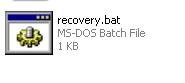
3.Save as dengan extensi *.bat misal “Recovery.bat”,pada bagian Save as Type pilih All File. Tekan Save

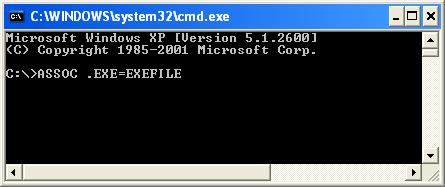
4.Lalu jalankan, terlihat nantinya CommanPrompt akan terbuka kembali dan kita dapat melakukan recovery dengan perintah ASSOC .EXE=EXEFILE ,Enter


ASSOC adalah perintah untuk Asosiasi ekstensi, Nah sekarang aplikasi .exe sudah bisa digunakan kembali.

kitapun bisa membuat ekstensi pribadi melalui cmd caranya:

1.ketik di CMD ASSOC .anharku=EXEFILE , Enter


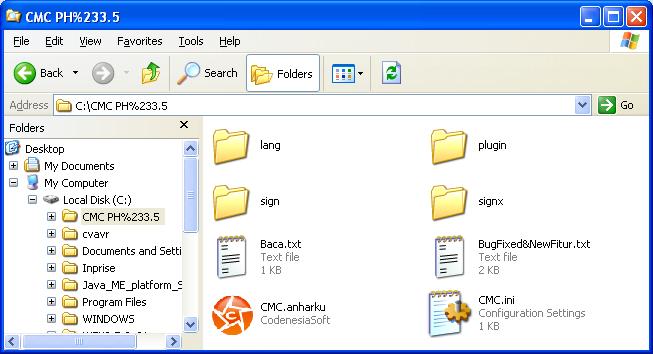
rename ekstensi aplikasi .exe anda menjadi .anharku


Klik2x aplikasi tersebut, maka aplikasi akan di jalankan seperti biasa.


Thanks to: lix_bayisehat

semoga bermanfaat....
[Read More...]


Essential Data Tools FileRescue Pro 4.4 build 72


Essential Data Tools FileRescue Pro 4.4 build 72
DOWNLOAD Essential Data Tools FileRescue Pro 4.4 build 72

FileRescue Pro is an easy to use, but powerful software utility designed to restore accidentally deleted files and folders. It allows you to recover files that have been removed from the Recycle Bin, as well as those deleted by-passing the Recycle Bin (e.g. Shift-Delete). It will also recover files deleted by virus or Trojan attacks, unexpected system shutdown and software faults.


DOWNLOAD:

MediaFire
http://adf.ly/3vJev
[Read More...]


Essential Data Tools ObjectRescue Pro 6.3 build 777


Essential Data Tools ObjectRescue Pro 6.3 build 777
DOWNLOAD Essential Data Tools ObjectRescue Pro 6.3 build 777

ObjectRescue Pro features innovative recovery algorithms and contains advanced data recovery capabilities that allow you to search various file types including music files, images, video, documents, mail or just about anything. As you know, modern digital devices allow files to be erased and the space on the media reused. So sometimes your data gets erased or crippled, either by physical damage to the media (e.g. a flash card crash), or because someone clicked the wrong button. Through momentary carelessness, valuable files can be lost in an instant. The media can also be bulk-erased or formatted, removing everything from the storage media. Of course you don't want to lose your priceless data. And there it is our ObjectRescue Pro is here to easily, quickly and absolutely reliably reconstruct the missing files.


Program features
- Recovers deleted and corrupted files
- Recovers data from formatted media
- Recovers data from corrupted media
- Supports all formats of multimedia, archive and document files *
- Supports all formats of media used by digital devices
- Works with all digital devices and card readers
- Easy to use, intuitive wizard-driven interface
- Supports all modern Windows versions, including Windows® NT/2000/XP/2003/Vista
- and many more!

DOWNLOAD:
MediaFire
http://adf.ly/3vJMF
[Read More...]


Essential Data Tools PhotoRescue Pro 6.3 build 777


Essential Data Tools PhotoRescue Pro 6.3 build 777
DOWNLOAD Essential Data Tools PhotoRescue Pro 6.3 build 777

Digital PhotoRescue Professional recovers lost data from a whole host of multimedia devices - from digital cameras to PDAs and mobile phones. PhotoRescue Pro supports CompactFlash cards (type I/II), IBM Microdrives, SmartMedia cards, MultiMedia cards (MMCs), Secure Digital (SD) cards, Memory Sticks, and any other storage devices (of course, "normal" Hard Disks and Floppy Disks too).


Modern cameras and other digital devices allow files to be erased and the space on the media reused. Through momentary carelessness, valuable pictures can be lost in an instant. The media can also be bulk-erased or formatted, removing everything from the storage media. Now, you won't loose it all because somebody clicked the wrong button.


Whether you unintentionally deleted your holiday snaps or formatted pictures on your data medium or have pulled it out during a write operation, not to worry - PhotoRescue Pro is here to easily, quickly and absolutely reliably reconstruct the missing data.


Program features
- Recovers deleted and corrupted files
- Recovers data from formatted media
- Recovers data from corrupted media
- Supports all image file formats *
- Supports all formats of media used by digital cameras
- Works with all Digital Still Cameras and card readers
- Easy to use, intuitive wizard-driven interface
- Supports all modern Windows versions, including Windows® NT/2000/XP/2003/Vista
- and many more!

DOWNLOAD:

MediaFire
http://adf.ly/3vIuE
[Read More...]


iCash 7.4.2


iCash 7.4.2
DOWNLOAD iCash 7.4.2

iCash is a software intended to control your personal finances, keeping track of incomes, expenses, credits, debts and Banks transactions for you. As simple as creating the accounts you need and move money between them! You don't even need to know about accounting or even care about it! Your finances depend largely on good organization that lets you know where your money comes from and to where it goes.


iCash is an easy-to-use, full featured and multi-purpose Personal Finance Manager tool for Macintosh and Windows intended to help you control all kinds of money issues. iCash can serve several small accounting needs for either private users, or clubs, associations, self-employed, small businesses or simply to be used at home, making keeping track of incomes, expenses and Banks transactions a snap. With a few clicks you can begin creating accounts and making transactions in minutes.


iCash is versatile and user-friendly. For this reason it doesn't use the principle of double-entry bookkeeping making it much easier to be used by people with very little or no accounting knowledge at all. Simply create accounts for all your expenses, incomes, Banks... and start moving money between them! iCash will then allow you to find out where all your money comes from and where it goes. All accounts are well organized according to user-defined categories and built-in types so reports can be tailored to include all records or only ones meeting specified criteria. iCash also allows you to have as many money manager documents as necessary so you can control almost anything from Clubs, associations, home and so on at the same time.


Key Features
No accounting knowledge required, no double-entry bookkeeping.
Easy-to-use, straightforward and user-friendly all-in-one interface.
Share your documents between your Mac and your PC hassle free.
Unlimited Accounts, Categories and Contacts.
Logical Account classification by category and type.
Multiple currencies support with exchange rate manager.
Transaction auto-balance and reconciliation.


Scheduled and recurring transactions support.
Full Budget support with customizable calculator.


Project categorization of transactions for queries and reporting.


Pre-defined customizable Reports.


Advanced recordable Queries and Statistics.


Chart creation by account, type, category including Profit & Loss.


Fast Import and Export of Categories, Accounts and Transactions. (OFX, QIF, CSV)
Powerful SQL database engine with auto-backup protection.
Multi-document interface with password protection.
Native versions for Mac OS X (Universal) and Windows.

DOWNLOAD:
MediaFire
http://adf.ly/3vIUY
[Read More...]


Internet Download Manager 6.07 build 15 Final


Internet Download Manager 6.07 build 15 Final
DOWNLOAD Internet Download Manager 6.07 build 15 Final

Internet Download Manager (IDM) is a tool to increase download speeds by up to 500 percent, resume and schedule downloads. Comprehensive error recovery and resume capability will restart broken or interrupted downloads due to lost connections, network problems, computer shutdowns, or unexpected power outages. Simple graphic user interface makes IDM user friendly and easy to use.


Internet Download Manager has a smart download logic accelerator that features intelligent dynamic file segmentation and safe multipart downloading technology to accelerate your downloads. Unlike other download accelerators and managers that segment files before downloading starts, Internet Download Manager segments downloaded files dynamically during download process. Internet Download Manager reuses available connections without additional connect and login stages to achieve better acceleration performance.


Internet Download Manager supports proxy servers, ftp and http protocols, firewalls, redirects, cookies, directories with authorization, MP3 audio and MPEG video content processing, and a large number of directory listing formats. IDM integrates seamlessly into Microsoft Internet Explorer, Netscape, MSN Explorer, AOL, Opera, Mozilla, Mozilla Firefox, Mozilla Firebird, Avant Browser, MyIE2, and all other popular browsers to automatically handle your downloads. You can also drag and drop files, or use Internet Download Manager from command line. Internet Download Manager can dial your modem at the set time, download the files you want, then hang up or even shut down your computer when it's done.


Key features of Internet Download Manager:


* All popular browsers and applications are supported! Internet Download Manager supports all versions of popular browsers, and can be integrated into any 3rd party Internet applications.
* Download with one click. When you click on a download link in a browser, IDM will take over the download and accelerate it. IDM supports HTTP, FTP and HTTPS protocols.
* Download Speed. Internet Download Manager can accelerate downloads by up to 5 times due to its intelligent dynamic file segmentation technology.
* Download Resume. Internet Download Manager will resume unfinished download from the place where they left off.
* Simple installation wizard. Quick and easy installation program will make necessary settings for you, and check your connection at the end to ensure trouble free installation of Internet Download Manager
* Automatic Antivirus checking. Antivirus checking makes your downloads free from viruses and trojans.
* Advanced Browser Integration. When enabled, the feature can be used to catch any download from any application. None of download managers have this feature.
* Built-in Scheduler. Internet Download Manager can connect to the Internet at a set time, download the files you want, disconnect, or shut down your computer when it's done.
* IDM supports many types of proxy servers. For example, IDM works with Microsoft ISA, and FTP proxy servers.
* IDM supports main authentication protocols: Basic, Negotiate, NTLM, and Keberos. Thus IDM can access many Internet and proxy servers using login name and password.
* Download All feature. IDM can add all downloads linked to the current page. It's easy to download multiple files with this feature.
* Customizable Interface. You may choose the order, and what buttons and columns appear on the main IDM window.
* Download Categories. Internet Download Manager can be used to organize downloads automatically using defined download categories.
* Quick Update Feature. Quick update may check for new versions of IDM and update IDM once per week.
* Download limits. Progressive downloading with quotas feature. The feature is useful for connections that use some kind of fair access policy (or FAP) like Direcway, Direct PC, Hughes, etc.
* Drag and Drop. You may simply drag and drop links to IDM, and drag and drop complete files out of Internet Download Manager.
* IDM is multilingual. IDM is translated to Arabic, Bosnian, Bulgarian, Chinese, Croatian, Czech, Danish, Dutch, French, German, Hungarian, Italian, Japanese, Lithuanian, Macedonian, Polish, Portuguese, Romanian, Russian, Slovenian, Spanish, Thai languages.

What's new in version 6.07 Build 14:

* Added support for new domain names of filesonic site
* Added digest authorization for web sites
* Fixed bugs

DOWNLOAD:

MediaFire
http://adf.ly/3vHiQ
[Read More...]


FolderSizes Pro 5.6.52


FolderSizes Pro 5.6.52
DOWNLOAD FolderSizes Pro 5.6.52

Desktop PCs and servers can quickly end up accumulating large quantities of unused, temporary, and duplicate files. Before you know it, you're out of drive space, backups are taking far too long to run, and users can't find the data they need when they need it. You need a visual, interactive software tool to help you manage disk usage. You need FolderSizes. FolderSizes is an award-winning, network-enabled disk space analysis tool. It can quickly isolate large, old, temporary, and duplicate files, or even show file distribution by type, attributes, or owner. All with multiple export formats, command-line support, shell context menu integration, and much more.


FolderSizes goes far beyond the capabilities of competing solutions by combining several tools into one: Disk Space Explorer - Awesome detail view, coupled with stunning graphical bar and pie graphs Duplicate File Report - Quickly isolate and manage duplicate files within any folder or volume Largest Files Report - FolderSizes can quickly show you which files are eating up the most space Oldest Files Report - Use your own criteria to find old files that may no longer be needed Temporary File Report - Eliminate temp file clutter left over from software installs, downloads, browsing, etc. File Owners Report - Discover which users are consuming the most space on local and network drives File Types & Attributes Reports - See the distribution of disk space by file type or attributes Drive Space Monitor - Instant, at-a-glance view of any local, mapped, or removable disk File Sizes, Names & Dates Reports...


“ Powerful, Intuitive, and Incredibly Fast ”


FolderSizes provides an engaging, interactive disk space analysis experience that you must try yourself to truly appreciate. More than just a series of great-looking reports, FolderSizes allows you to visualize your disk space usage from multiple perspectives.


FolderSizes has a world-wide user base of IT professionals, power users, and enterprises of all sizes - each looking to maximize their storage resources and minimize waste. It employs an amazing, multi-threaded file system scanning engine that shows you results immediately - as the scan is progressing!


Benefits & Solutions
Explore, visualize, and comprehend local and network storage
Reclaim gigabytes of drive space - fast!
Improve storage capacity planning capability
Find the disk space hogs with just a few clicks
Manage and monitor disk space across the network (Pro edition only)
Publish disk usage reports right to your web server share
Streamline file systems to optimize backups
Monitor and enforce employee data storage policies
Find excessively long file names that interfere with CD storage, etc.
Find recently saved files without knowing their names (find recently modified)
Find files owned by a specific individual or group
View the "size on disk" (actual space consumed) for any file or folder
Visualize the distribution of files by file type, age, and size
Find and eliminate empty folders
Search files by nearly any file attribute combination
Schedule the generation of nearly any FolderSizes report (Pro edition only)


Features
Hierarchical folder map visualization (based upon treemap technology)
Integrated scheduler (Pro edition only)
Unicode file and folder name support
Interactive, dynamic, full-color bar and pie graphs
Fast, multi-threaded, network-aware file system scanning
Isolate largest, oldest, duplicate, and temporary files
View disk space utilization by file type / attributes
View local & network disk space usage by owner / group
Command line interface for scripting & integration (Pro edition only)
FilterZip regular-expression based compression system
See total & free space for fixed, removable, network drives
Export reports in HTML, XML (Pro edition only), CSV, and more
Integrates with the Windows shell context menu (32 and 64 bit support!)
Extremely configurable - colors, fonts, print options, etc.
Flexible, multi-path oriented search and file reporting systems
Strong support for viewing allocated disk space (e.g. "size on disk")
"Command Prompt from Here" in all context menus
Super-fast, in-memory database provides stunning performance
Support for direct entry of UNC network paths in all reports
Optional symbolic link skipping

DOWNLOAD:
MediaFire
http://adf.ly/3uvM1
[Read More...]


ComputeHASH Utility v1.1


ComputeHASH Utility v1.1
DOWNLOAD ComputeHASH Utility v1.1

Compute hashes for Adler32, Crc32, Md4, Md5, Sha1, Sha256, Sha384, Sha512, Ripemd160, Tiger, Whirlpool

ComputeHASH Utility Checksums:
Compute hashes for Adler32, Crc32, Md4, Md5, Sha1, Sha256, Sha384, Sha512, Ripemd160, Tiger, Whirlpool
Checks file hash comparison (multi algorithms)
Computes files and strings
Create *.sfv, *.md5 files
Read *.sfv, *.md5 files
Copy to Clipboard
Export to text file


Compatiblity:
Windows 7
Windows 8
Windows Vista
Windows XP


Changelog 1.1:
Bug fix


DOWNLOAD:

MediaFire
http://adf.ly/3uvKV
[Read More...]


CocSoft Stream Down 6.8.0


CocSoft Stream Down 6.8.0
DOWNLOAD CocSoft Stream Down 6.8.0

CSoft Stream Down is a streaming media download tool. It supports not only HTTP and FTP download, but also streaming media download such as RTSP, MMS, MMSU, MMST. Streaming media is a kind of multimedia file which transports on a network using streaming technology. Streaming media is the most popular way to play online, including streaming audio, streaming music, streaming media, streaming movies etc. You can listen or watch it online.


But if you don't have enough bandwidth or if the quality of transfer is not good, you can not play the streaming media which you want to watch or listen. Do you therefore think about downloading streaming media? Or after you have enjoyed it online do you want to play or download your favorite streaming media and add it to your private collection? Do not worry! CoCSoft Stream Down now enables you to download streaming media on the internet. For only $39, you can get any file you want from internet, especially streaming media.


But if you don't have enough bandwidth or if the quality of transfer is not good, you can not play the streaming media which you want to watch or listen. Do you therefore think about downloading streaming media? Or after you have enjoyed it online do you want to play or download your favorite streaming media and add it to your private collection? Do not worry! CoCSoft Stream Down now enables you to download streaming media on the internet. For only $39, you can get any file you want from internet, especially streaming media.

DOWNLOAD:
MediaFire
http://adf.ly/3uysK
[Read More...]


Checkpagerank.net
Jangan Lupa Tinggalkan jejak Sobat Di
Surya-Cakra
Return to top of page Copyright © 2012 | Surya Converted into Blogger Template by Cakra